ServiceNow HRSD: The Client/Server Gap

Hi there,
While developing a record producer as part of an HRSD project, I observed a recurring pattern of unexpected behavior caused by the gap between client and server state in ServiceNow.
This behaviour became obvious while I was working on the record producer, which contained over 150 variables. They all had differnet behavior, depending on the company of the employee - which is taken from the HR profile via a Script Include + Client Script.
The thing is that, UI Policies, client scripts, and company detection logic all run in the browser — but on form submission, the server reads all variable values and mandatory flags directly from the database, with no knowledge of what was visible or hidden.
Here are more details about this whole thing:
1. What was the problem
ServiceNow catalog forms are configured using UI Policies, client scripts, and GlideAjax calls. These tools control what the user sees — which fields appear, which are required, and what values are pre-populated. They all run in the browser.
When a user submits the form, the browser is done. The server takes over. And the server has no knowledge of what the browser showed or hid.
The case description is generated by the out of the box script include hr_ServicesUtil. This script, among other things, iterates over all variables and reads their value from the database.
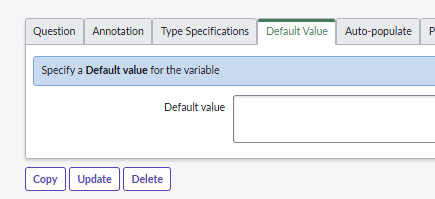
It also has no awareness of the UI policies - just reads whatever was stored. So if a variable has a default value stored at the level of the variable, the script will pick up this value and display the field in the case description.
What the documentation says
The documentation is not wrong, but it is incomplete.
The ServiceNow Community describes Catalog UI Policies as client-side scripts that control visibility, read-only status, and mandatory nature of fields, executed in real-time as users interact with catalog forms.
(Source: Mastering Catalog UI Policies, ServiceNow Community, Jan 2025) What it never states is what happens to field values on submit.
All variable values submit regardless of visibility — hidden fields are not excluded.
The community also states that Data Policies, unlike UI Policies, execute on the server.
(Source: UI and Data Policies, ServiceNow Community)
This implies UI Policies are browser-only — but the submission consequence is never stated.
Mandatory flags set in the database are always enforced on submit, independently of what the form showed.
Finally, the official documentation notes that if a variable is set to mandatory and does not have a value, readonly or hide do not work on that variable.
(Source: Service Catalog UI Policy, docs.servicenow.com)
What this means in practice is never explained: a field marked mandatory in the variable configuration cannot be hidden.
Setting mandatory in the variable configuration and controlling visibility via UI Policy are mutually exclusive — the platform forces the field visible.
2. Learning the hard way : my observations
The following symptoms were discovered during the HRSD implementation I worked on. The catalog items involved had:
• Over 150 variables per catalog item
• Company-based conditions across 7 entities
• Choice-based conditions — fields visible only when another field had a specific value
All four symptoms below are manifestations of the same root cause: the browser/server state gap.
Case 1— Hidden fields with default values still submit
Variables configured with a default value submit that value on form save, even if the field was hidden by a UI Policy for a given company or form choice.
Example:
A field value appeared in a submitted case that the employee never filled in.
Real example from the implementation:
• Field: u_percentage
• Default value: 135%
• Visible only for a specific company A
• A B company employee submitted the form — field was hidden, but the default was saved when the case was submitted
• HRS case description showed "Percentage: 135%" which lead to confusion
Case 2 — Mandatory state set by UI Policy persists in the variables formatter
When a UI policy sets a field mandatory for a specific company during form submission, that mandatory state is not automatically cleared when the field is hidden for other companies.
Afer the case is created, HR agents opening the case see those fields flagged as mandatory in the variables formatter - even for companies where the field was hidden on the form.
Examples:
- u_variable_1 — made mandatory via client script for company A only; appeared mandatory in the formatter for company B agents, blocking them
- u_variable_2 — same problem in reverse for company A agents
This is a not a submission issue. The employee submits without problems. The problem surfaces on the case view, for agents.
Case 3— "Applies on Target Record" crashes on the HR Case view
Client scripts written for the catalog form can be configured to also run on the backend HR Case record ("Applies on Target Record" setting). When checked, the script runs on the case view — where catalog-specific objects do not exist.
Real example from the implementation:
- A client script referencing a catalog-specific filter object via window[...]
- That object only exists on the catalog form — not on the HR Case view
- Result: "Cannot read properties of null" on the case view
- Fields that should have been read-only remained editable and mandatory for agents — unintended behavior
Case 4 — Variables formatter shows all variables after submission
After a case is submitted, the variables formatter widget on the HR Case form displays all variable values — regardless of which company the employee belongs to, and regardless of what was visible on the form at submission time.
"Applies on Target Record" on UI Policies helps for the HR Case form view, but not for the formatter widget, which reads directly from question_answer in the database.
No correction has been implemented for this observation. The variables formatter remains an open problem.
The only architecturally clean solution — mapping variables to custom COE fields — requires a significant redesign of all catalog items and has not been prioritised.
In the meantime, a custom description Script Include which I made, partially mitigates the impact by filtering the case description, but the formatter itself is unaffected.
3. Consequences
The four observations above have the following concrete consequences.
The most immediate consequence concerned HRS agents and employees directly.
When hidden fields with default values submitted silently, incorrect data appeared in the case description.
The mandatory state issue affected HR agents on the case view. When mandatory state set during form submission persisted into the variables formatter, agents were blocked from processing the case.
They saw fields flagged as mandatory that were irrelevant to the employee's company, with no way to resolve it without developer intervention.
The "Applies on Target Record" crash affected HR agents working on the case backend. When a client script ran on the case view where catalog-specific objects do not exist, the script failed silently and fields that should have been read-only remained editable for agents — an unintended and undetected behavior.
Finally, the variables formatter issue affects HR agents reviewing cases. Agents see variable values that are irrelevant to the employee's company or form choices, which can cause confusion or lead to incorrect processing decisions.
4. Possible Corrections
Each observation requires a different correction. Three of the four have been resolved. One remains an open problem.
Correction 1 — Hidden defaults: use execute() and reverse()
Remove the default value from the variable configuration.
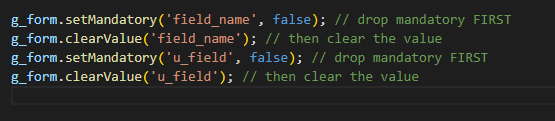
Use the UI Policy script functions to set the value only when the field is visible, and clear it when the field hides.
// UI Policy execute() script — runs when condition is true (field shows):

// Guard: only set if empty — prevents overwriting a value the user typed
// UI Policy reverse() script — runs when condition becomes false (field hides):

Correction 2 — Hidden mandatory: use the same boolean for both
Don't mark a field mandatory in the variable configuration if it is conditionally hidden.
Instead, set and clear mandatory dynamically in the same client script that controls visibility
// In the GlideAjax callback after company detection:
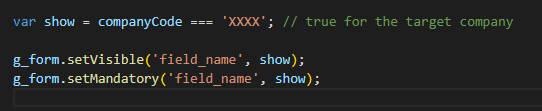
// Same boolean — visibility and mandatory always stay in sync
Correction 3 — "Applies on Target Record": uncheck and separate
Uncheck "Applies on Target Record" on any client script that references catalog-specific objects (variable collectors, window[...] filters, g_list).
Handle the case view separately using UI Policy actions on the HR Case table (Read Only = True).
Correction 4 — Variables formatter: no clean solution today
This observation does not have a complete solution. Current recommendation: accept the limitation for now.
Available options
1) The Display Business Rule + g_scratchpad + client script pattern is a partial fix at best.
It hides empty variables but cannot filter by company. It also requires running from Global scope in HRSD — a scoped Business Rule fails silently and produces no visible error. (Source: Hiding Empty Variables in the Variable Editor)
2) Setting "Applies on Target Record" on a UI Policy is also only partial. It affects the HR Case form view but does not control the formatter widget, which reads variable values directly from the database.
Community threads confirm this does not work reliably on the target record after submission. (Source: Variable set not visible on record created from record producer)
3) Mapping variables to custom COE fields is the only architecturally clean answer. Real fields on the case table can be controlled by standard UI Policies, giving full conditional visibility on the case view.
But this was not a good fit for my case. (Source: Best practice for variables on HR Cases/HR Tasks)
4) Cloning the formatter widget is technically possible but not recommended. It creates upgrade risk and adds scope complexity in HRSD. (Source: Displaying Variables on a Back-End HR Case Form)
Conclusion
In conclusion, having gone thought the process of developing the forms without knowing, initially, the implications generated by the complexity of the forms - 150 variables it's a lot! - I can say that this has been a great learning experience.
I am now able to detect why some issues related to the form are happening and of course, have a better understanding of the inner workings in ServiceNow.
Hope this helps someone else as well.